Revibe: A Wearable to Support Focus and Executive Functioning

For many students, staying focused, getting started on assignments, remembering instructions, and completing tasks can be just as challenging as learning the material itself. These difficulties are often associated with executive functioning challenges, ADHD, and other disabilities that can affect attention and self regulation. Fortunately, there are tools available to students who struggle with staying on task. And the best part of the tool that we are looking at today is that it completely aligns with the districts current approach to technology and screentime reduction.
Revibe, developed by Pearson, is a wearable device designed to help individuals improve focus, attention, and self regulation through personalized reminders and feedback. And, the device is actually built around a Samsung Galaxy Watch7, making this tool completely blend in with other students smartwatches.
We Have Solutions! – Episode 47: September News and Review Round-Up
On the latest episode of “We Have Solutions,” the AT Help Desk podcast, Seaver talks about assistive technology news, Neil Squire updates, and touches on some new apps, including an incredible (free) assistive technology tool finder.
Listen on Amazon Music or Spotify.
Unstuck and On Target: Building Executive Function Skills for Success

Executive function skills play an important role in learning, independence, and daily life. These skills help individuals plan, organize, manage emotions, adapt to change, and work toward goals. For many students, especially those with autism, ADHD, anxiety, or other executive functioning challenges, these tasks can be difficult. Unstuck and On Target is a research-based program designed to help children and youth develop these essential skills in a structured and practical way.
Learn & Try: A Free Resource for AT Users

Finding the right technology to help with a particular task can sometimes feel like a challenge. There are thousands of apps, programs, and built in computer features available, but knowing which one is right for you is another story. This is where Learn & Try can help.
Learn & Try is a free online resource from Raising the Floor that helps people discover technology tools that can make their computers easier to use. Rather than requiring users to already know the name of a particular program or accessibility feature, the website allows you to search for tools, browse available options, or use the Tool Finder to receive personalized suggestions.
Tiimo Visual Planner

For many people with disabilities, managing daily routines, remembering tasks, transitioning between activities, and staying organized can be challenging. Executive functioning skills such as planning, time management, task initiation, and maintaining focus are often areas where additional support is needed. Thankfully, there are plenty of apps (and techniques) available that are designed specifically for supporting individuals with Executive Functioning challenges.
Tiimo is a visual planning and scheduling app designed to help address these challenges by providing structure, flexibility, and accessible tools that support everyday independence. Originally developed with input from people with ADHD and autism, Tiimo has evolved into a powerful assistive technology solution for a wide range of users.
Neil Squire and SMART Technologies Team Up on Accessibility
Written by Brent Stempfle
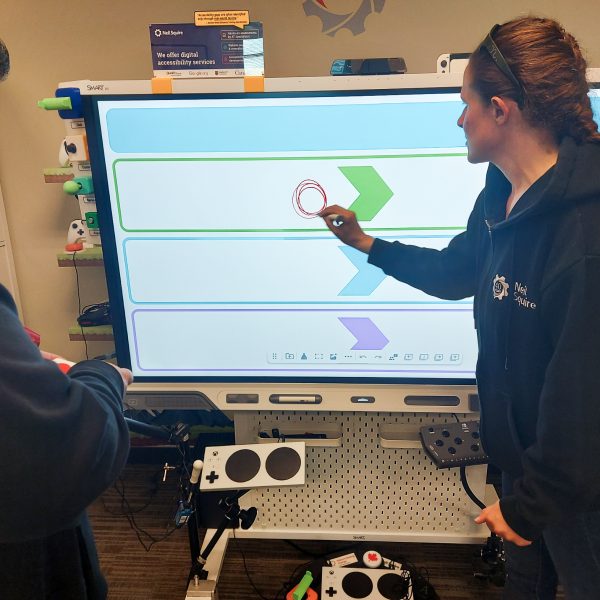
Gordon Watt and Jody Dickerson have built their careers on making technology work for people with disabilities. As Neil Squire’s Distance Training Coordinator, Gordon provides technology training and support to people across Canada through the Distance Computer Comfort program. Jody, an Assistive Technology Specialist and Trainer, helps individuals find and master the tools that support their goals, tailoring each system to the person. Both also carry out technology evaluations, testing accessibility features and working to improve independence. When SMART Technologies approached Neil Squire to evaluate the accessibility of their SMART Boards, it was a natural fit. Evaluating technology and identifying accessibility barriers is a significant part of the Society’s work. Gordon and Jody’s experience working with the users of these assistive technologies meant they could offer practical feedback grounded in real-world, disability-related needs.
We Have Solutions! – Episode 45: AI as AT, the Decentralization of AT, and Apps to Keep Students Engaged During the Summer Months
In the latest episode of “We Have Solutions,” our AT Help Desk team talks about using AI as Assistive Technology, the decentralization of technology and assistive technology and what that means for AT users, and finally, they talk about a series of apps designed to keep students engaged and learning during the summer months.
Listen on Amazon Music or Spotify.
5 Apps to Prevent Summer Learning Loss

Summer break is almost here, and students and teachers across the country are no doubt counting down the days until their well-earned freedom. But for many students, summer break also means a “summer slide”, where a significant portion of the knowledge that they’ve acquired during the school year will be lost. In fact, according to Scholastic, elementary students lose roughly twenty to twenty-seven percent of their learning progress during the summer months.
So, in an attempt to prevent some of that inevitable learning loss, we’ve compiled a list of five apps designed to keep students on track as they enjoy their summer break.
Clarify Assistant: An Accessibility-Focused Writing Tool for iOS

Clear communication can be a daily challenge for many individuals, especially for people with disabilities that affect writing, language processing, or fine motor skills. Clarify Assistant on the Apple App Store is designed with this reality in mind, offering an integrated writing support tool that works directly within the iPhone and iPad keyboard.
Polypad by Amplify: A Free Math Manipulative App

Not long ago, I was visiting an elementary school when a resource teacher asked me if I knew of a free math manipulative app that students could access on their iPads. I wasn’t sure what to recommend at the time, so I decided to do a little digging, and I discovered a great app that definitely deserves a mention.
Polypad by Amplify is a free virtual space where students can explore mathematical concepts using interactive manipulatives, models, and tools. Originally developed by Mathigon and now part of Amplify’s educational ecosystem, Polypad combines the flexibility of a digital whiteboard with a comprehensive collection of math resources.