
With the advent of virtual personal assistants (VPA), assistive technology users are able to interact with their smartphones in ways that weren’t possible just a few years ago. These virtual personal assistants employ user-inputted voice commands to perform a wide variety of functions like sending messages, scheduling reminders, and even ordering groceries, giving assistive technology users with impaired vision or mobility an alternative way to interact with their smartphone or tablet. There are a few virtual assistants on the market right now, and most of them have been discussed in previous e-bulletins. This week, we’re going to look at Google Assistant, the built-in virtual personal assistant that comes pre-loaded on Android smartphones (Android 6.0 and above) and on Android smartwatches.
Edmondo: The Virtual Classroom App

Edmondo is a free app for teachers, students, and administrators that has been designed to centralize and digitize homework, communications, and classroom resources. The app allows teachers to create and upload quizzes, lessons, and resources to a virtual classroom which can then be accessed by students. With a userbase of nearly 100 million, and a consistent ranking in the top 10 education apps on iTunes, Edmondo is a major player in the world-wide shift away from the rigidity of traditional educational practices.
How-to: Use Scrible PDF Viewer

With the advent of the internet, access to information has grown exponentially. Gone are the days when “research” meant spending hours upon hours at the library, sorting through hundreds of obscure publications in search of a few articles relevant to the subject at hand. With so many legitimate online journals and publications to choose from, it’s completely feasible for a student to complete and in-depth research project without ever having to set foot in a library. For students who are physically disabled, accessing the library and all its contents can be a huge barrier to completing assignments in a timely manner, and for students with learning disabilities, libraries can represent a potential information overload that can make it difficult if not impossible to narrow in on the materials that are most relevant to their area of study.
The Best Buy Tech Grant

Best Buy Canada is offering tech grants to Canadian public schools for students within any grade range from kindergarten to grade 12. These grants are designed to provide students with the latest in technology (and assistive technology), encouraging and empowering them to reach their maximum potential during the primary, secondary and even post-secondary years.
Distance Computer Comfort Training

Are you someone with a physical or sensory disability who would like to learn more about technology from the comfort of your own home? Are you interested in learning more about how to use your computer, laptop, tablet, or smartphone?
Seeing AI
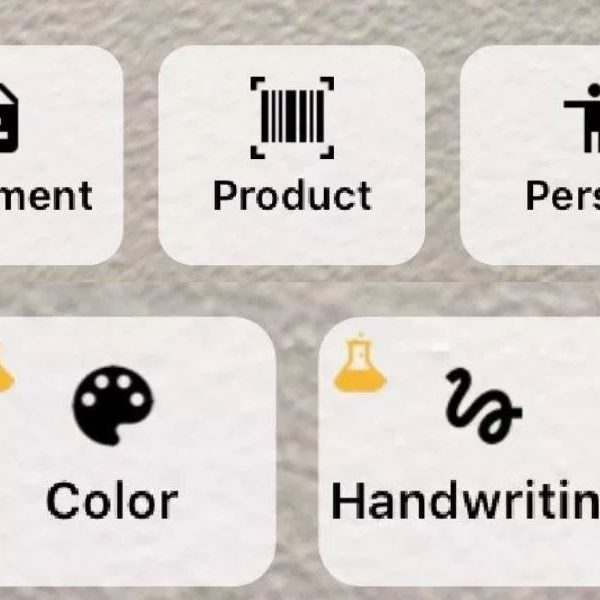
Today we’re going to look at an app that’s designed to narrate the outside world to individuals with low or no vision: Seeing AI. This free app provides accurate audio descriptions of the outside world, using an abundance of features to simulate sight, backed by human-like intelligence. The idea for the app is simple; point your camera at person, product, object, document, color, or piece of text, and the app will give you a highly accurate description of the object in question.
Be My Eyes: App Review

Be My Eyes is a free app that connects blind or low-vision users to sighted volunteers who offer visual assistance in real-time using video conferencing technology. The app is designed to be straightforward in its functionality, as well as being easily accessible for low or no-vision users.
How To: Use Google Assistant
Dropbox Paper
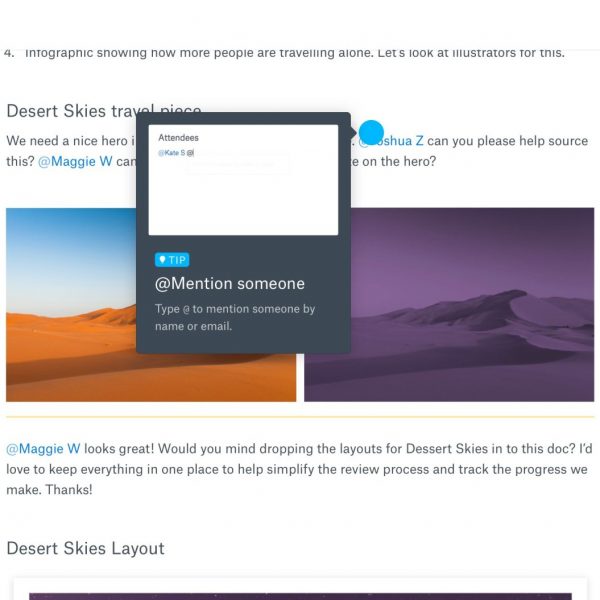
In case you haven’t heard of it, Dropbox is a cloud-based storage service that allows users to upload and share files from anywhere in the world, on virtually any device. Now, imagine combining that service with a free productivity and collaboration app that allows users to integrate their Dropbox files with other resources from around the web, while also allowing a multitude of users to comment on and add information to a cloud-based document.
G-Suite Accessibility Features: Part 2

Last week we looked at some of the accessibility features that are supported within the G-suite, Google’s free, online, suite of productivity apps. In last week’s e-bulletin we looked briefly at Gmail, Google Calendar, Google Docs, and Google Drive. This week we will continue to explore the G-suite, and we’ll look at Google Sheets, Slides, Drawings Forms, Sites, Hangouts, and Classroom.
G-Suite Accessibility Features: Part 1
Today we’re going look at the wide variety of accessibility features that are available for Google’s G-Suite. The G-suite is a free, online collection of productivity apps that gives users access to E-mail, video conferencing, spreadsheets, and much more. These free apps are absolutely packed with built-in accessibility features that are constantly being modified and refined, making them a great choice for AT users who want a no-cost and highly accessible solution to everyday online tasks.

 |
| 400 – 3999 Henning Drive |
| Burnaby, BC V5C 6P9 |
| 604 473 9360 | 1 877 673 4636 |
| solutions@neilsquire.ca |
| Refer today |
|
|
 |
| 400 – 3999 Henning Drive |
| Burnaby, BC V5C 6P9 |
| 778 945 1215 |
| hearingsolutions@neilsquire.ca |
| Refer today |
|
|